Tactical 3D: A 3D Football Tactical Board for Coaches and Fans
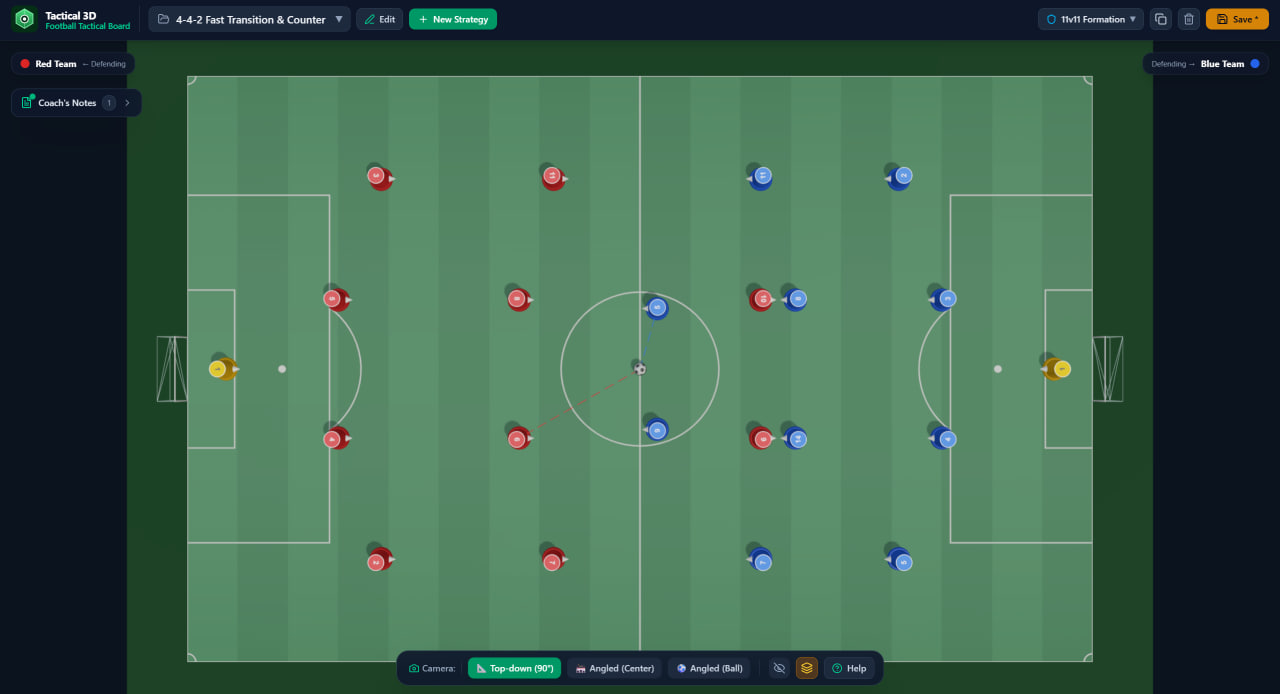
Tactical 3D is a 3D football tactical board that lets coaches and football fans place players and the ball on a virtual pitch, save match situations, attach coaching notes, and switch between realistic 3D camera angles — all from a browser, and comfortable enough to use on a tablet during a real training session.
Most tactics boards are flat. Tactical 3D isn't.
What Is a 3D Football Tactical Board?
A football tactical board is a digital tool that replaces the classic whiteboard with magnetic dots. Instead of sliding magnets around a metal sheet, a coach drags player tokens across a virtual pitch to explain formations, pressing schemes, set pieces, and attacking patterns.
Tactical 3D takes this one step further: the pitch exists in three dimensions. You can look straight down at the field to analyse spacing and shape — or tilt the camera to a low, angled view that shows the situation the way you'd actually see it from the touchline.
Key Features
Full control over players and the ball
Build any situation from scratch: drag all 11 players for each team, position goalkeepers, and place the ball anywhere on the pitch. Each team is clearly colour-coded, players wear shirt numbers, and you can mark which side is attacking and which is defending — so a screenshot of the board is instantly readable for your players.
Save and show match situations
Every setup can be saved as a named strategy — for example, "4-4-2 Fast Transition & Counter". Over time you build a personal library of prepared situations: your pressing traps, your corner routines, your counter-attacking shape. Before a match, you don't rebuild anything — you just open the saved board and show it. Tactical 3D also ships with ready-made strategy templates, so you can start from a standard formation instead of an empty pitch.
Coach's notes attached to the board
A diagram without context is easy to forget. Tactical 3D includes built-in Coach's Notes, so you can write down why the situation works — triggers, player responsibilities, coaching points — right next to the diagram. Your reasoning stays attached to your tactics.
Multiple camera angles with presets
Three built-in camera views cover every coaching scenario:
- Top-down (90°) — the classic tactical view. Best for shape, spacing, and line distances.
- Angled (Center) — a broadcast-style perspective from the middle of the pitch. Best for overall balance between both teams.
- Angled (Ball) — a camera focused on the ball. Best for explaining pressing, overloads, and decision-making around the ball.
Switching between views takes one tap — which is exactly what you want when standing in front of a squad with a tablet.
Why 3D Beats a Flat 2D Board
A 2D board shows you where players stand. A 3D board shows you what the game actually looks like.
Football happens in depth, not on graph paper. From a 90° view, a passing lane may look open — but tilt the camera and you see the centre-back blocking it. For concepts like defensive blocks, third-man runs, and pressing distances, an angled view communicates in seconds what would take minutes of talking on a flat board.
Built for Clubs Without a Software Budget
Professional tactical software and custom club analysis tools can cost hundreds or thousands per year — money most youth academies, semi-pro clubs, and amateur teams simply don't have. Tactical 3D is built for exactly this audience: a capable football tactics board that runs in the browser, with no installation, no hardware, and no setup. If your club can open a web page, you can use it.
Who Is It For?
- Youth and amateur coaches — explain formations and pressing schemes in the locker room or right on the pitch, from a tablet.
- Academies and semi-pro clubs — build a reusable library of training situations and set-piece routines without paying for enterprise software.
- Football fans and content creators — illustrate tactical debates and match analysis with clean, readable 3D diagrams instead of arrows on a screenshot.
How to Plan a Situation in 4 Steps
- Open a strategy template (for example, 4-4-2) or an empty 11v11 board.
- Drag players and the ball into the positions you want to discuss.
- Add coach's notes — triggers, roles, key coaching points.
- Save the situation by name and present it later from any camera angle.
FAQ
Is Tactical 3D free to use? Yes — Tactical 3D runs in the browser and is positioned as an affordable alternative to expensive tactical software for small clubs.
Does it work on a tablet? Yes. The interface is designed for touch, so coaches can use it on a tablet during training sessions and team talks.
Can I save my formations and reopen them later? Yes. Every setup can be saved as a named strategy and reopened anytime, so you build a personal library of match situations over time.
What camera views are available? Three presets: Top-down (90°) for shape and spacing, Angled (Center) for overall balance, and Angled (Ball) for pressing and ball-oriented situations.
Who is Tactical 3D for? Coaches of youth, amateur, and semi-pro teams — as well as fans and content creators who want to explain football tactics visually.
Plan your next match like a pro. Open the Tactical 3D football tactical board and build your first situation in under a minute. 3D-football-tactical-board

Writing on autonomous systems, high-load architecture, and tech leadership.